Menu :
Inventory(存货)
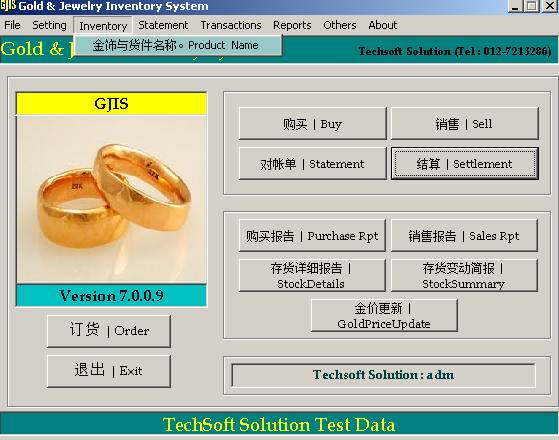
Product Name
Creating
a new Product Name
。
4 3 2 1


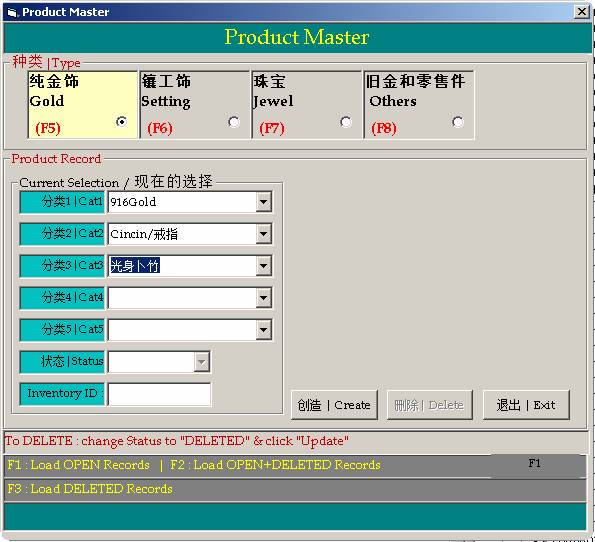
[1] Cat1: Purity (916G/850G/375G/etc..)
Click the triangular arrow
and select a category or enter a new sub-category (Cat1)
[2] Cat2: Type (Ring/Bracelet/Necklace/etc..)
Click the triangular arrow and select a category or enter a new sub-category (Cat2)
[3] Cat3: Shape/Pattern
Click the triangular arrow and select a category or enter a new sub-category (Cat3/4/5)
[4] Click "Create" button
Update/Delete/UnDelete a Product Name
2 3 5 4 1







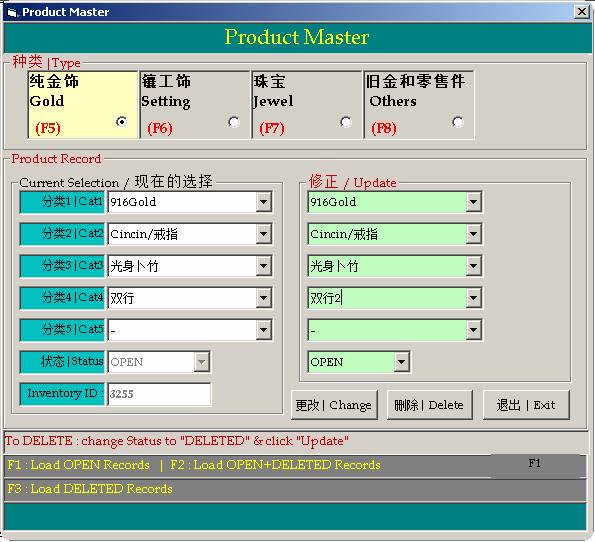
Update/Delete/UnDelete a Product Name
To Update
an existing Product Name:
[1] Select the product name by clicking the triangular arrow in each Cat1/2/3/4/5.
[2] Change the Cat2/3/4/5 name as you like on the right as shown above.
[4] Click "Change" button
To Delete
an existing Product Name:
[1] Select the product name by clicking the triangular arrow in each Cat1/2/3/4/5.
[5] Click "Delete" button
To UnDelete a deleted Product Name:
[1] Press F3 (to load deleted record) and select the product name by clicking
the triangular arrow in each Cat1/2/3/4/5.
[3] Change the Status to "OPEN"
[4] Click "Change" button.