eInvoice
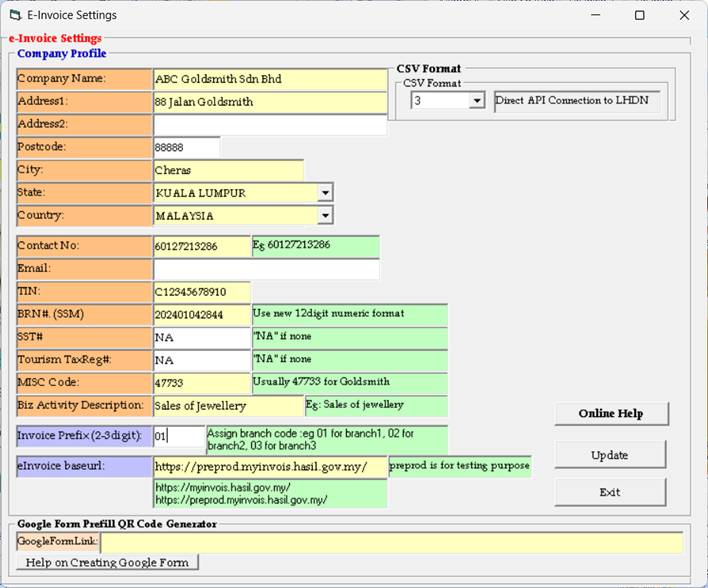
Settings
baseURL:
For test environment in LHDN, please use https://preprod.myinvois.hasil.gov.my
For real myinvois environment in LHDN, please use https://myinvois.hasil.gov.my

If multiple branches,
please give each branch a prefix: Eg 001, 002, 003 etc for each branch as
LHDN doesn’t allow similar invoice number for same
SSM number. If no other branch, just
leave this Invoice Prefix empty. Leave
blank if you have not created google form LHDN requires SST
and Tourism # Type “NA” if none Optional: Address2 Email (Leave blank
if none)





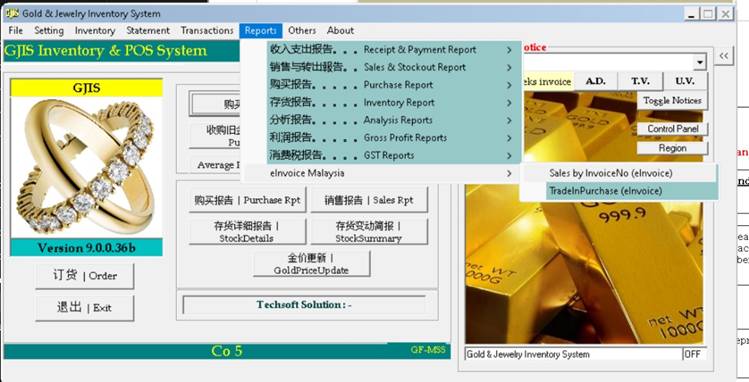
After updating einvoice settings, the main
dashboard for einvoice issuance will be at
Reports-eInvoice Malaysia
A. Sales by Invoice :
1. eInvoice Sales (For
customer who request eInvoice)
2. eInvoice Credit
Note (For customer who doesn’t require eInvoice)
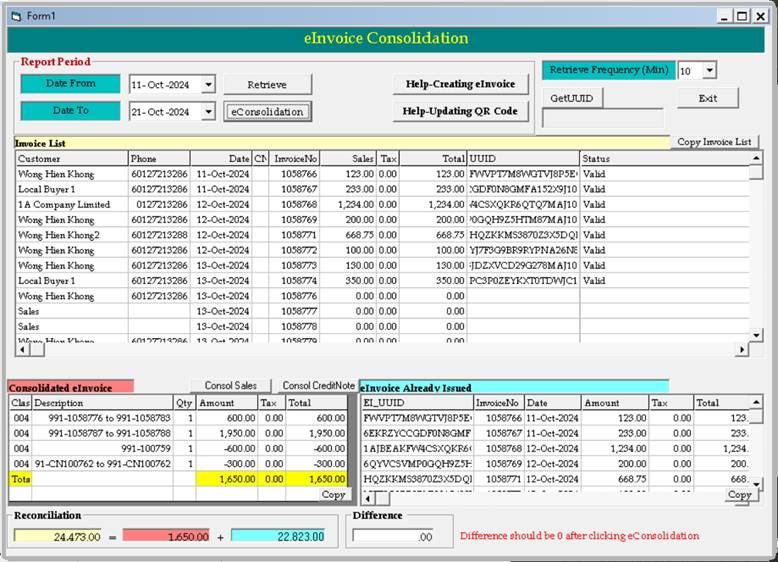
3. Consolidated
eInvoice Sales (To be submitted within 7 calender days the following month)
4. Consolidated eInvoice
Credit Note (To be submitted within 7 calender days the following month)
B. TradeInPurchase:
1. eInvoice Self-billed (For tradeins)
2. Consolidated Self-billed (During 6
months relaxation period only).
Sample Dashboard
Individual eInvoice issued